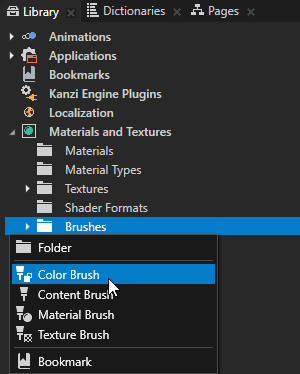
Note that you can set only the background of 2D nodes.
Use the Viewport nodes to set the size of a render target surface onto which content is projected.
Viewport 2D is a special node because it can render both 2D objects, such as Image, Page, Button 2D, and a Scene, which is a 3D object. When you create a new Kanzi Studio project, the project has a Viewport 2D with a Scene that contains a Camera and a Directional Light.
To create a Viewport 2D node:
You can control how Kanzi renders a Viewport 2D node with the Foreground Hint property:
You can control how Kanzi renders a Viewport 2D node. See Controlling how Kanzi renders a Viewport 2D node.
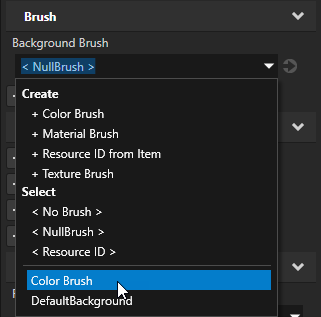
Use brushes to set the background of 2D nodes. In Kanzi all 2D nodes by default have transparent background.
To set the background:
To create a Viewport 2D object, attach it to the RootPage, and add to it either a Scene or 2D content:
// Create a Viewport 2D named Viewport 2D and add it to the RootPage.
Viewport2DSharedPtr viewport2d = Viewport2D::create(domain, "Viewport 2D");
rootLayer->addChild(viewport2d);

// To render 3D objects in a Viewport 2D you need to add a Scene to the Viewport 2D.
// Create a Scene named Scene and add it to the Viewport 2D.
SceneSharedPtr sceneNode = Scene::create(domain, "Scene for 3D objects");
viewport2d->setScene(sceneNode);

// Create a Camera named Camera and add it to the Scene.
CameraSharedPtr camera = Camera::create(domain, "Camera");
sceneNode->addChild(camera);

// Create a Point Light named Point light and add it to the Scene.
LightSharedPtr light = Light::createPoint(domain, "Point light");
sceneNode->addChild(light);

// Create a Box mesh named Box and add it to the Scene.
Model3DSharedPtr box = Model3D::createCube(domain, "Box", 1.0f, ThemeBlue);
sceneNode->addChild(box);
For details, see the API reference.
